
Your lawyers already live in M365. We meet them there.
Paralegent AI fits into the Microsoft 365 stack your legal team already uses — SharePoint for contract storage, Teams for alerts, OneDrive for sync, Outlook for intake. 18+ agents review contracts in 2-8 minutes without a single new tool.





AI adoption fails when it requires workflow change.
Lawyers refuse to switch to yet another tool. Paralegent AI eliminates the adoption barrier by embedding directly into the M365 apps they already open every day. No new login. No new interface. No disruption.
Contract libraries that review themselves.
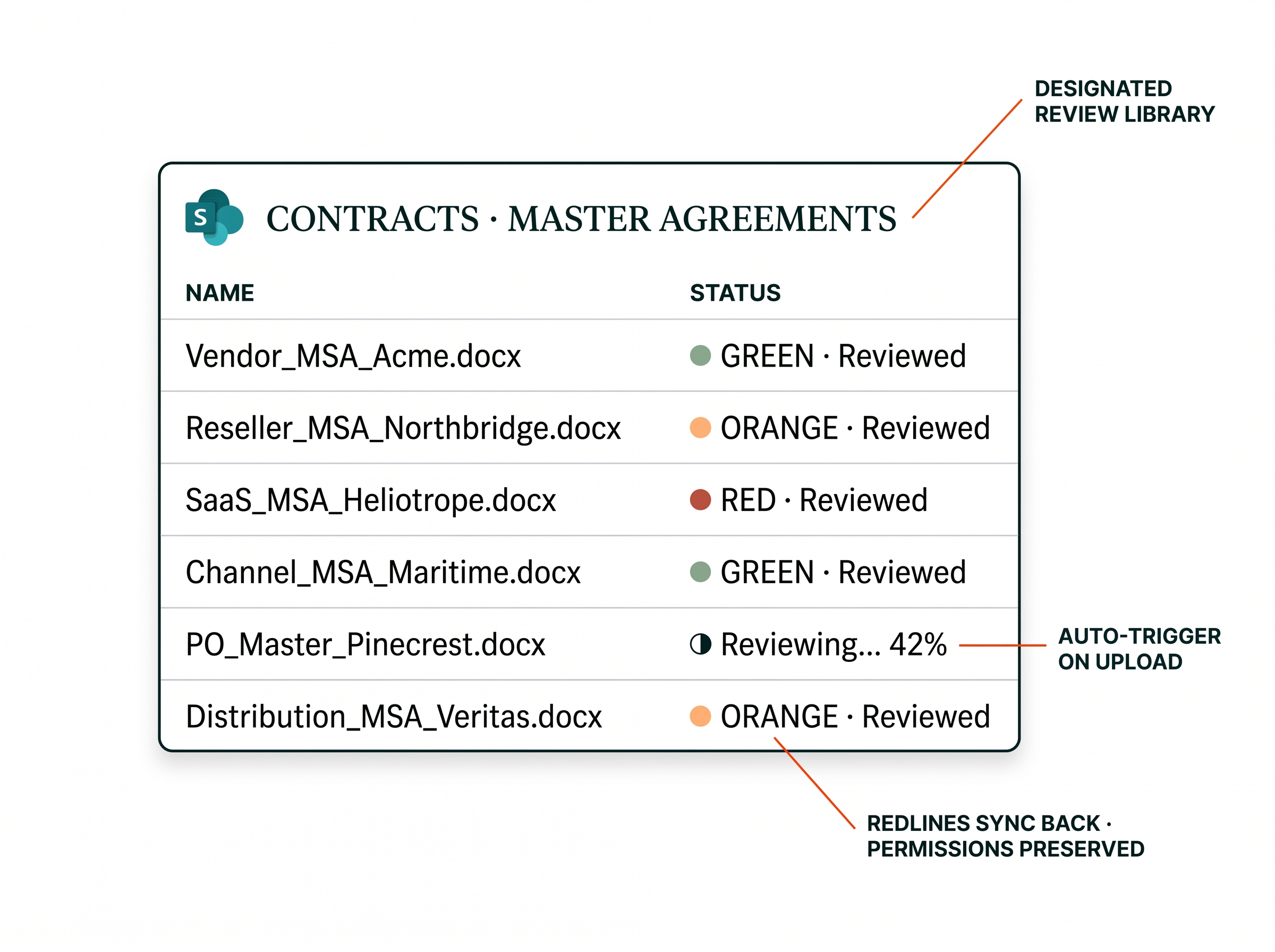
Upload contracts to a designated SharePoint library — Paralegent AI detects the new document and triggers 18+ agents automatically. Redlined documents with GREEN/ORANGE/RED classification sync back. No manual initiation. Permissions preserved.
- Auto-trigger on new uploads
- Redlines sync back to source library
- SharePoint permissions preserved
RED findings alert your team instantly.
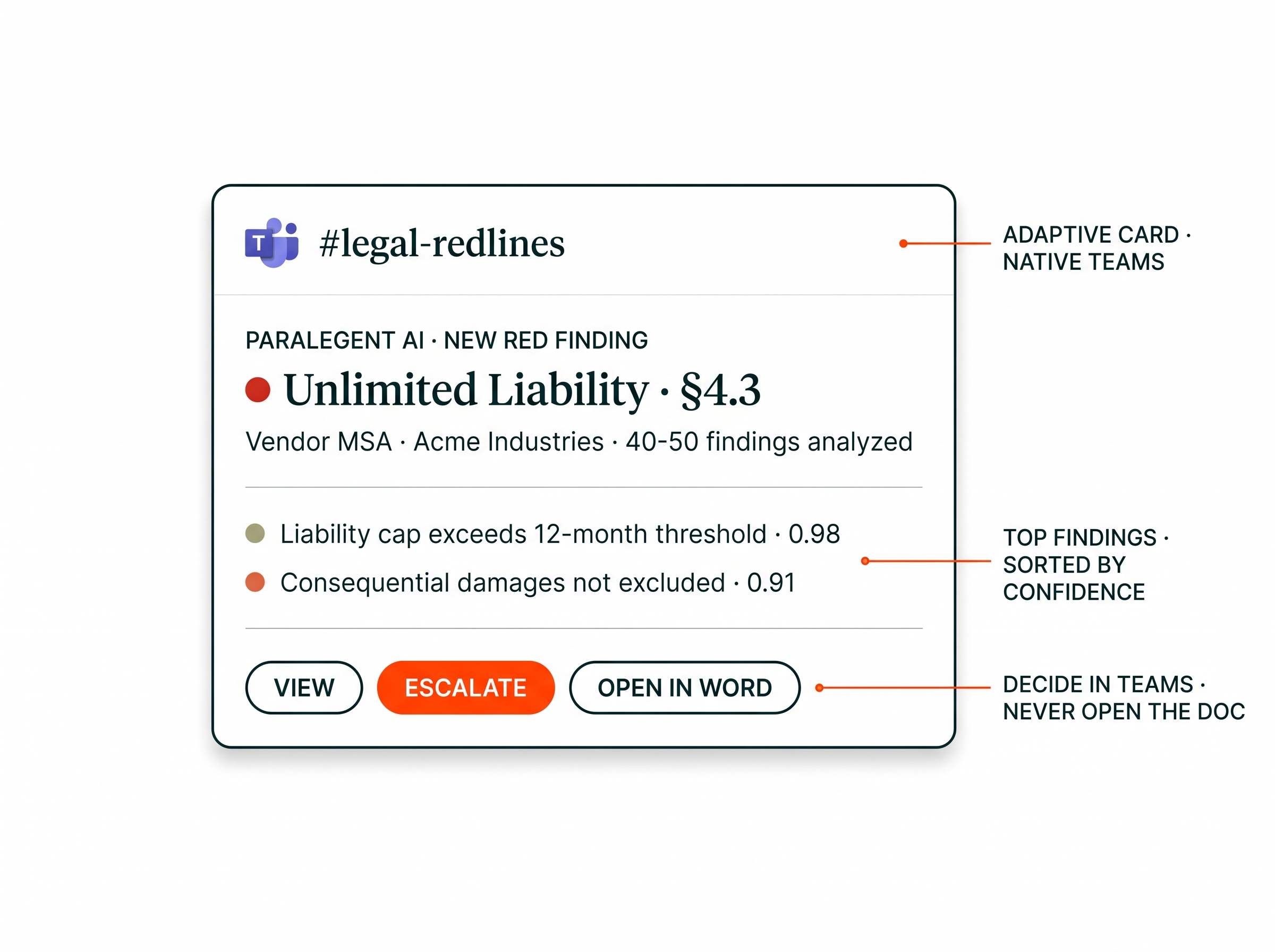
Review completions fire to assigned Teams channels. RED findings — unlimited liability, unilateral termination — trigger immediate alerts. Adaptive Cards show classification, top findings, and action buttons. Lawyers make decisions in Teams without opening the document.
- Adaptive Cards with action buttons
- RED findings escalate instantly
- Channel-based routing per team
Every version synced. Full audit trail.
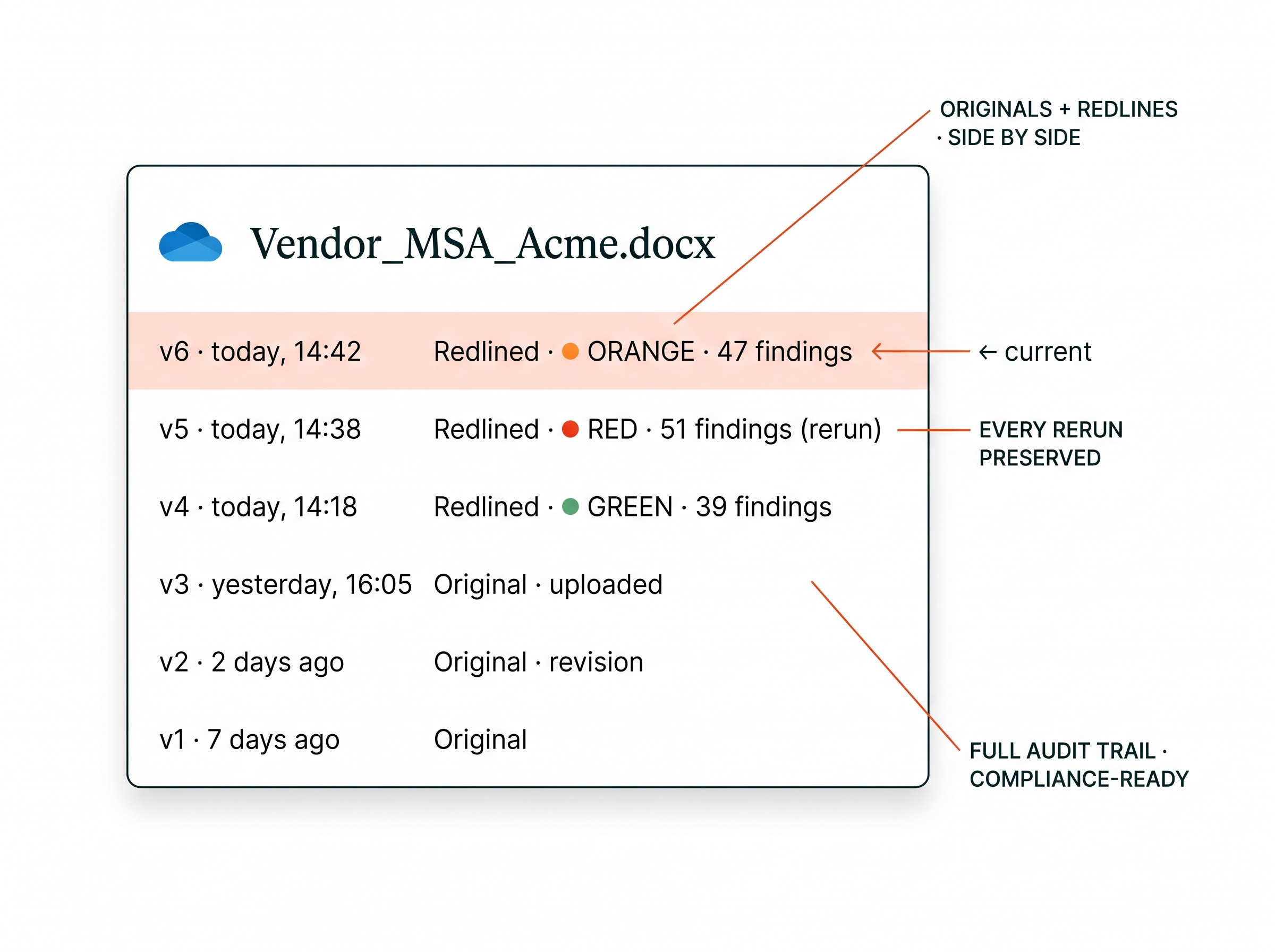
Original and redlined documents stored side by side with full version history. Every review cycle preserved for compliance. 18+ agents process documents without data leaving your tenant.
- Automatic version sync
- Originals + redlines side by side
- Zero data leaves your M365 tenant
Forward an email. Trigger a review.
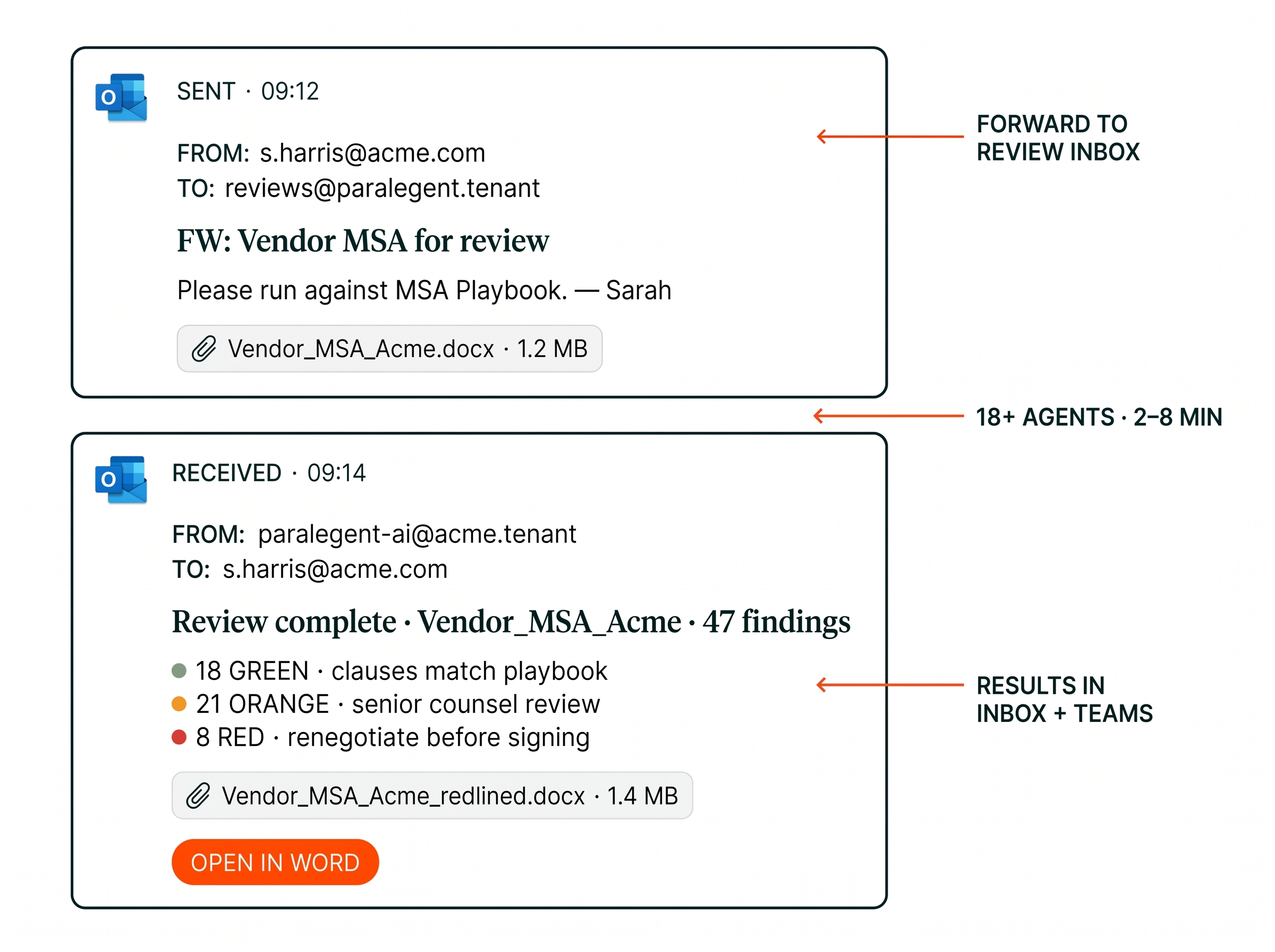
Forward contract attachments to a designated inbox — 18+ agents analyze the document in 2-8 minutes. Results delivered to your inbox and Teams simultaneously. Contract intake from email without switching apps.
- Forward-to-review inbox
- Results in 2-8 minutes
- Inbox + Teams delivery
Deploy across your org from the admin center.
IT administrators manage Paralegent AI through the M365 admin center — group policy, Azure AD, centralized rollout.
Configure in M365 Admin Center
IT deploys Paralegent AI as a centralized add-in. The add-in appears automatically in Word for all assigned users. Supports M365 E3, E5, and Business Premium plans.
Assign via Azure AD Group Policy
Control rollout by department, user group, or individual. Legal, Procurement, Compliance — IT retains full control over who can trigger reviews and access results.
Configure SharePoint Libraries
Designate document libraries as review folders. Paralegent AI monitors for new uploads and triggers 18+ agents automatically. Results sync back with classification and redlines.
Set Up Teams Channels
Map channels to departments or contract types. RED finding escalation routes to designated approvers. Adaptive Cards deliver summaries with action buttons.
Enterprise SSO via Azure AD
Single sign-on with conditional access, MFA, and compliance policies. Per-user authentication through your existing identity provider. Zero new credentials.
M365 integration comparison.
How Paralegent AI's M365 integration compares to SaaS alternatives and manual processes.
| Paralegent AI | SaaS Legal AI | Manual Process | |
|---|---|---|---|
| SharePoint | ✓ Auto-trigger + sync | ✗ Separate upload | ✗ Manual filing |
| Teams | ✓ RED alerts + Adaptive Cards | ✗ Email only | ✗ None |
| OneDrive | ✓ Automatic versioning | ✗ Manual download | ✓ Manual save |
| Outlook | ✓ Forward-to-review | ✗ Separate portal | ✗ Manual forward |
| Admin deployment | M365 admin center | Vendor portal | N/A |
| Authentication | Azure AD SSO | Vendor-specific | N/A |
| Data sovereignty | ✓ Your M365 tenant | ✗ Vendor cloud | ✓ |
| Analysis time | 2-8 minutes | 10-15 min | 20-30 hours |
Zero new tools. Maximum adoption.
Five outcomes from deploying inside the Microsoft 365 ecosystem your team already uses.
- SharePoint auto-triggers. Upload a contract and 18+ agents start reviewing automatically. No button to click. No portal to visit.
- Teams for instant escalation. RED findings surface in Teams within seconds. Lawyers make decisions where they already collaborate — not in a separate tool.
- OneDrive for compliance. Every version of every reviewed contract preserved with full audit trail. Originals and redlines side by side.
- Outlook for intake. Forward an email attachment — get classified redlines back in 2-8 minutes. Contract intake happens from your inbox.
- IT-controlled rollout. M365 admin center + Azure AD group policy. Centralized deployment, per-department access, enterprise SSO.
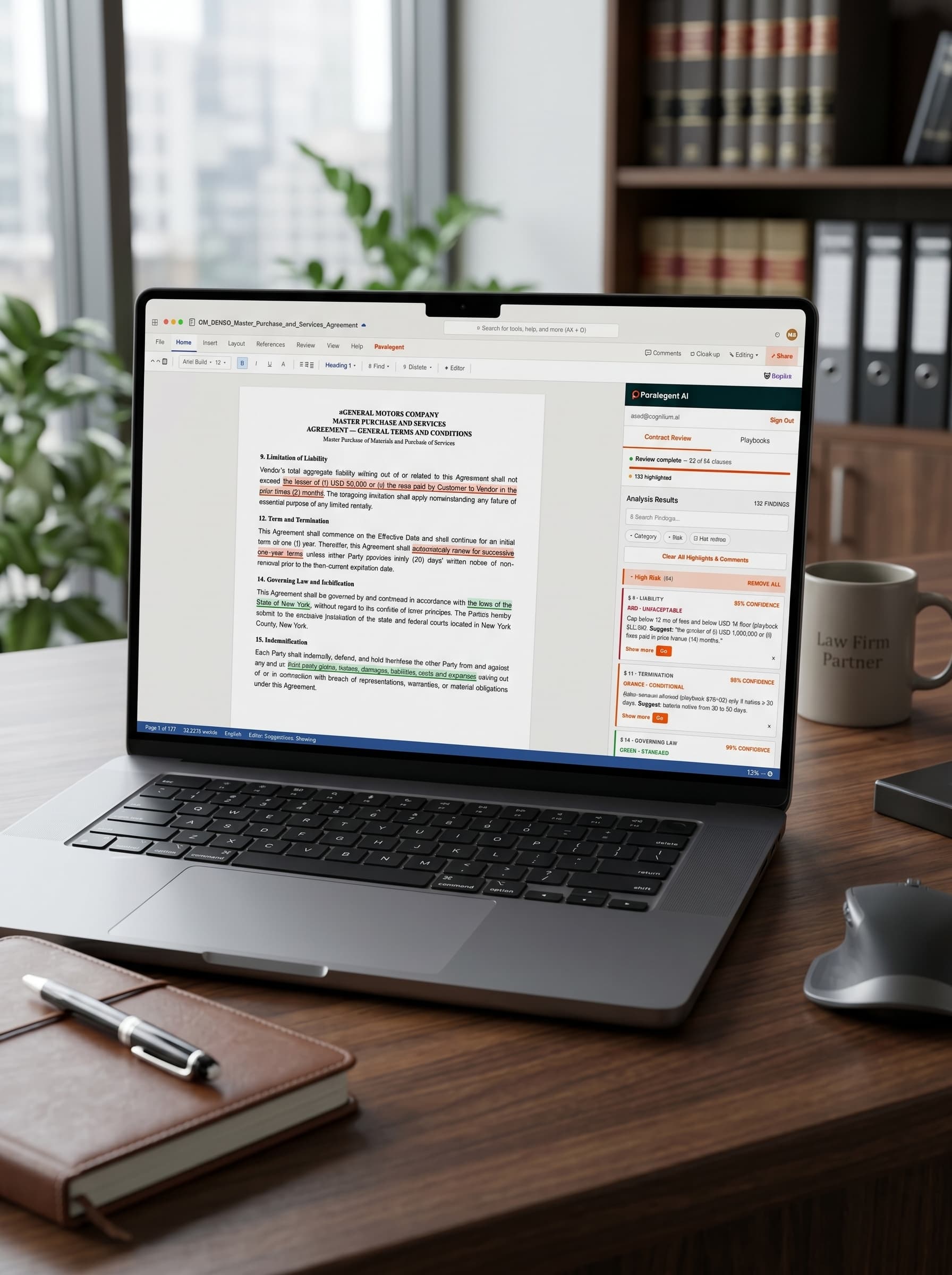


See Paralegent AI inside your Microsoft 365.
Request a demo — we'll show SharePoint triggers, Teams alerts, and enterprise deployment running in your tenant.
Microsoft 365 questions.
Common questions from IT administrators and legal operations leaders about the M365 integration.
How does Paralegent AI integrate with Microsoft 365?
Paralegent AI deploys across the Microsoft 365 ecosystem — SharePoint for document storage and automatic review triggers, Teams for real-time notifications, OneDrive for version sync, and Outlook for contract intake. 18+ agents analyze contracts in 2-8 minutes without leaving your M365 tenant.
Can I trigger contract reviews from SharePoint?
Yes. Upload contracts to a designated SharePoint document library and Paralegent AI triggers review automatically. 18+ agents analyze every clause against your 80-150-term playbook. Results with GREEN/ORANGE/RED classification sync back to the same library.
How do Teams notifications work?
Paralegent AI sends real-time notifications to Microsoft Teams channels when reviews complete. RED findings — unacceptable clauses like unilateral termination or unlimited liability — trigger immediate alerts to assigned reviewers. Adaptive Cards show classification and action buttons.
Does Paralegent AI work with OneDrive?
Yes. OneDrive for Business provides automatic sync for all reviewed contracts. Original documents and redlined versions with GREEN/ORANGE/RED classification stored side by side with full version history. Complete audit trail for compliance.
Can I submit contracts from Outlook?
Yes. Forward contract attachments to a designated Paralegent AI inbox or trigger review directly from email. 18+ agents analyze the document against your playbook in 2-8 minutes. Results delivered to your inbox and Teams simultaneously.
How is this different from the Word Add-in?
The Word Add-in is for individual lawyers reviewing contracts on demand. Microsoft 365 integration is the enterprise ecosystem layer — SharePoint triggers, Teams alerts, OneDrive sync, Outlook intake. Both use the same 18+ agents and the same playbook.
How is Paralegent AI deployed in M365?
Through the Microsoft 365 admin center as a centralized add-in managed by IT. Rollout is controlled via Azure AD group policy — specifying which users, groups, and departments have access. No individual installations required. Enterprise SSO with full RBAC.
Does data stay within our M365 tenant?
Complete data sovereignty. 18+ agents run on your own Azure OpenAI, Bedrock, or Vertex AI accounts. Contracts in SharePoint and OneDrive never leave your tenant. Zero data egress to third-party infrastructure or Paralegent servers.
What M365 plans are supported?
Microsoft 365 E3, E5, and Business Premium. The integration uses Microsoft Graph API and Office.js — compatible with Word Desktop, Word Online, SharePoint Online, Teams, OneDrive for Business, and Outlook. 18+ agents operate across all supported tiers.
How long does M365 integration setup take?
Microsoft 365 integration is configured in weeks 5-6 of the 8-10 week implementation. Covers Azure AD setup, SharePoint library triggers, Teams channel alerts, Outlook connector, and group policy deployment — all tested with real contracts before go-live.